
This article explains how to access the University of New Mexico’s Concur travel system, complete your traveler profile, assign travel delegates, and locate additional training resources.
Environment
- University of New Mexico (UNM)
- SAP Concur Travel System
Purpose
UNM uses SAP Concur as its official travel management system. Concur is managed by the UNM Purchasing Department and automatically applies UNM-negotiated pricing and agreements for:
- Airfare
- Hotels
- Rental vehicles
The system allows travelers to book, manage, and track university business travel from a single application.
Before You Book Travel
Complete the following setup steps before making travel arrangements.
Step 1: Sign in to Concur
Access the UNM Concur login page:
Sign in using your UNM credentials.
______________________
Step 2: Complete Your Traveler Profile
Before booking travel, update your traveler profile with your personal information.
Your profile should include:
- Legal name (must match government-issued identification)
- Date of birth
- Contact information
- Traveler preferences
- Airline loyalty programs (optional)
- Hotel preferences (optional)
Training Video
Updating Your Travel Profile in SAP Concur
______________________
Step 3: Add Travel Delegates
Travel delegates can book and manage travel on your behalf.
Please add the following individuals as delegates:
- Heather Sissons
- Rebekah Lucero
Adding delegates allows them to:
- Book flights using your traveler profile
- Ensure reservations remain associated with your account
- Purchase travel using a UNM Purchasing Card (PCard)
- Bill travel expenses directly to UNM when appropriate
Adding a Delegate in SAP Concur
Step 1: Click on the account Settings from the Concur Profile.
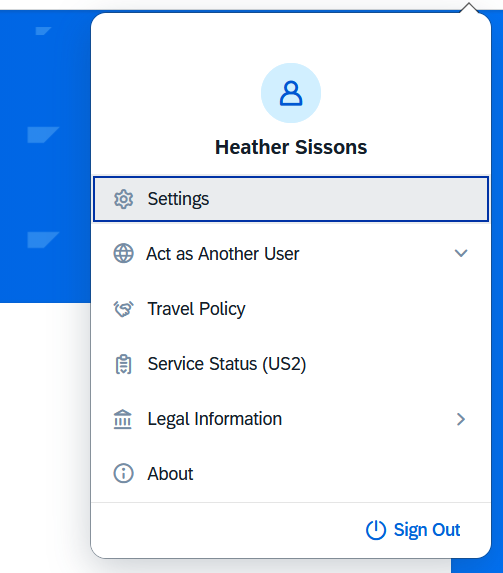
Step 2: Click Setup Travel Assistants.

Step 3: Click on Add an Assistant.
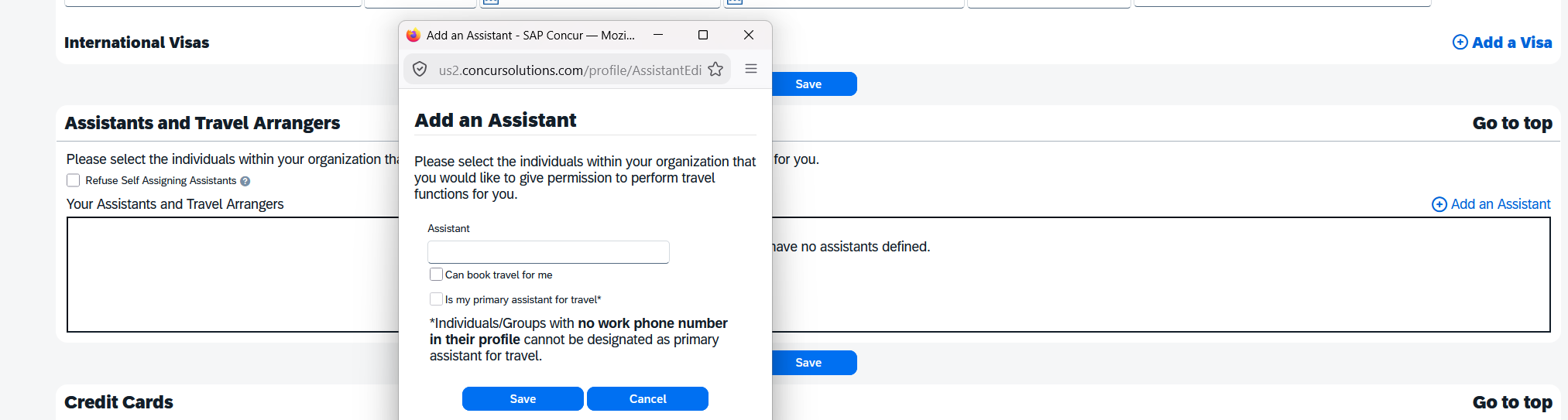
Step 4: Search the name of the Travel Assistant to be added, then click Can book travel for me button in the dialog box and press save.