- Navigate to https://unm.service-now.com/esc
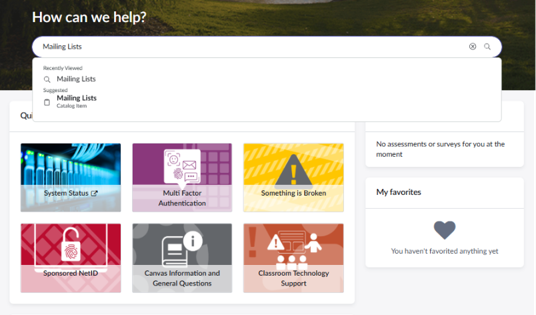
- In the Search Bar under “How can we help?” type in Mailing List or click here Mailing Lists – Employee Center
- Select Mailing List (Listserv) Request and fill out the form.
You will need the following information:
1. List Name: A shortened version of the name. Ex: SS12_Water-L
- The listname must end with ‘-L’.
- You may use any combination of letters and numbers.
- Use an underscore (_) in the place of a space.
- Punctuation and special characters (e.g. # $ % & ) are not allowed.
2. Full Name of list: Long form of name. Ex: Small Systems 12 Water
3. Description: Short description of what the list is for.
4. Primary list owner: This should be the swefc email (Netid) to ensure continuity of access.
5. Secondary list owner: This should be whoever will manage day to day.
6. How do you want to handle subscribe requests?
- By Owner: subscribe requests are approved by the owner
Open: anyone can subscribe to the list automatically
7. Does this list need to be hidden from the list website?
- No
8. How would you like to send the settings configured? (Select what applies to your listserv)
- Owner: only the owner can post
- Private: only list subscribers can post
- Public: anyone can post to the list
9. Would you like archives?
- Yes (Select Monthly)
10. Would you like to provide any additional information about this request?
- N/A
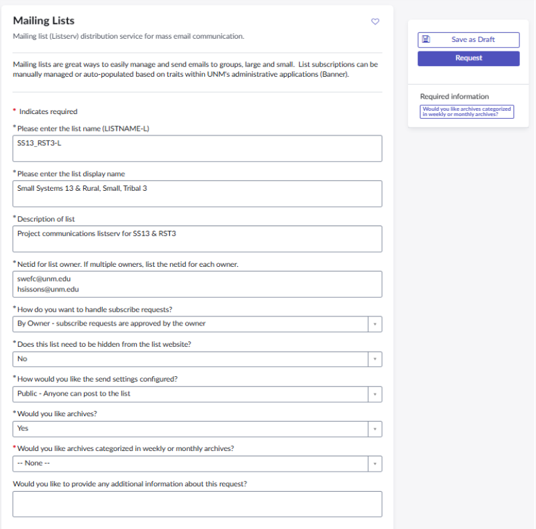
Form Example: